Beta We are beta testing now, and open for business soon.
Everything it does
Built for long recordings and large surveys, by people who review them: every feature here is in Sound Onion today.
See
From a whole recording to a single call
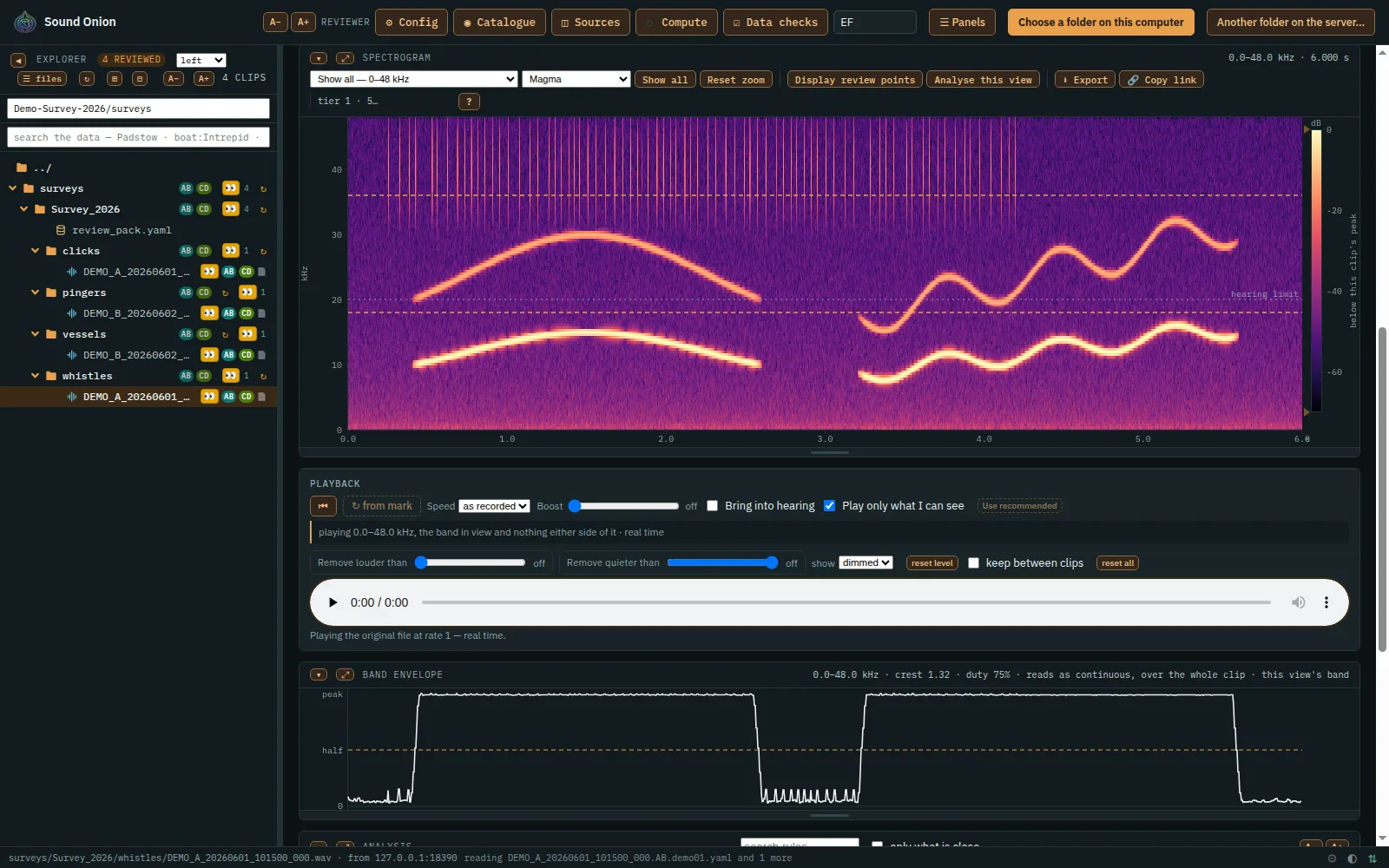
Zoom smoothly from a whole recording down to a single call. Where a recording has pre-drawn detail levels, only what is on screen is fetched; past the finest, your browser draws the view from the samples themselves.
Every recording's own range
Each recording's colours span its own range of levels, not a fixed one, so quiet sea noise still shows beneath a loud rumble, and a colour means the same level at every zoom.
Peel the onion
Drag a ceiling or a floor along the decibel scale and the colours spread over what is left: take the loud layers off and the quiet sounds stand out.
Your view, your way
Choose which panels show and in what order, size each one, fold them away or fill the screen with one. Pick the frequency range and any of 17 colour maps, print-ready greys among them, and put the file list on any side of the page.
Trace a sound
Shortcut keys analyse the loudest sound under the cursor and add it to your review.
Pictures on your own disk
Open a folder on your own computer in any browser and Sound Onion draws the spectrograms right there, the same as the server would; in Chrome or Edge it can also save its work back into the folder.
Hear
Lossless
The original file's own samples at their own rate, never transcoded.
Slow it down
Two, four or eight times slower, live, with no copies written.
Bring it into hearing
Shift the band on screen down into hearing, as a bat detector does, with its rhythm and timing untouched.
Only what you can see
Playback is filtered to the frequency band on screen, with a steep 48 dB per octave cut.
Filter by level
As it plays, take out what is louder or quieter than a level you set, frequency by frequency, so a quiet sound at another frequency can be heard at the same moment as a loud one.
Audible in one press
The Use recommended button sets the speed and shift that bring the band into hearing. Nothing changes until you press it.
Boost safely
Up to 48 dB of gain, rounded off at the top so it never hard-clips.
Point to point
Playback skips from one marked box to the next.
Hear the catalogue
Hear a sketch of a catalogue entry, made from its numbers and played through the clip's own settings, and switch between it and the recording.
Measure
Analyse this view
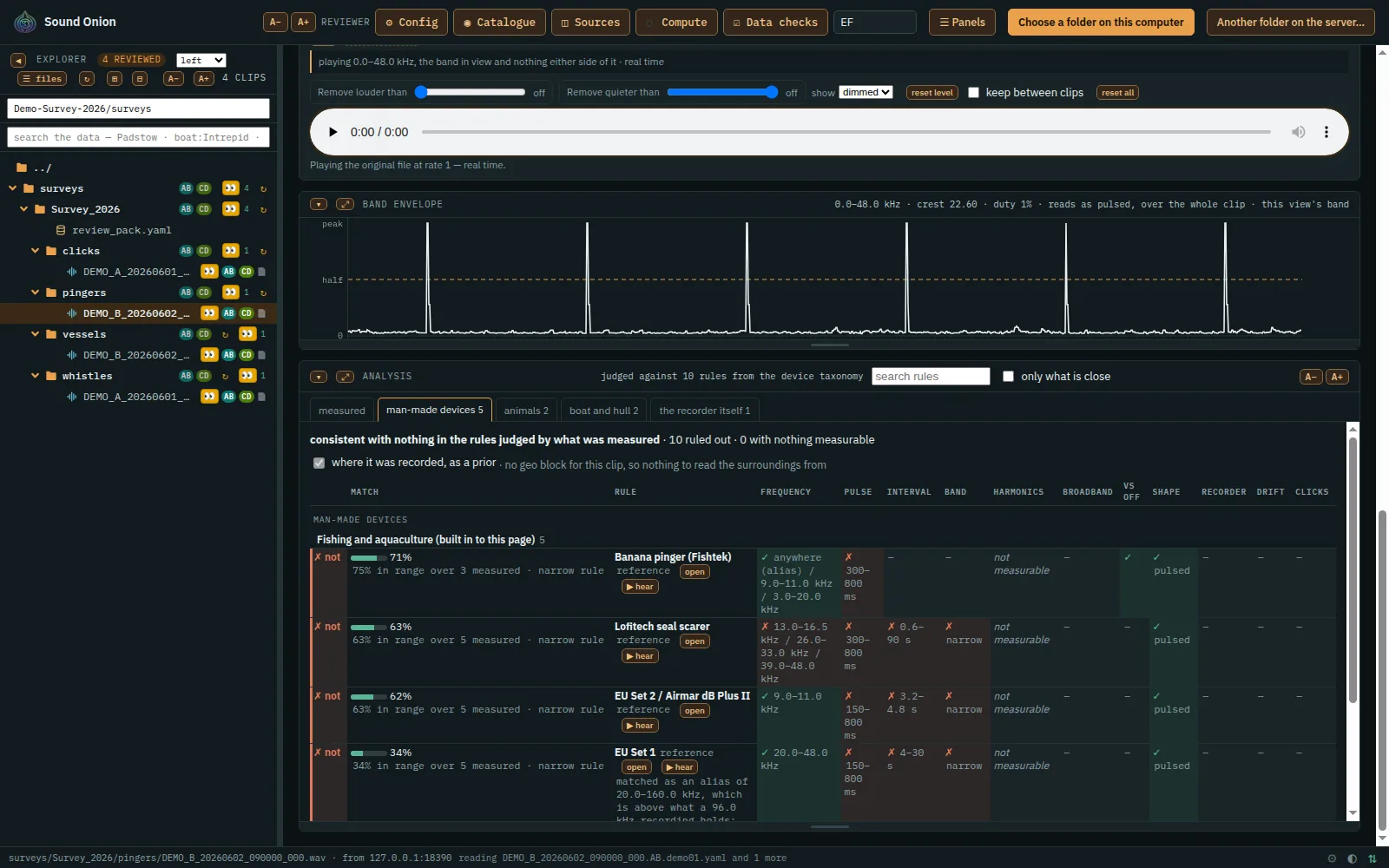
The Analyse this view button measures what is on screen: dominant frequency, band, pulse length, interval, beat and shape. It reads only those seconds, tells apart several sounds in one band, and tags harmonics.
Matched to a catalogue
Each animal, device and ambient sound in the catalogue gets a percentage fit, and how much evidence that fit rests on, allowing for aliasing. An entry with a wide, vague range cannot win just by being wide.
Where it was recorded
What is near the recording (fisheries, ports, wind farms and other map layers) re-orders the matches, each with a one-line reason. You can switch this off.
A catalogue with sources
Devices, animals and ambient sounds, each entry citing where its numbers came from, and an editor to add your own.
Detectors
Scans for pingers, steady tones and porpoise clicks. The pinger and click scans use the same catalogue as the page.
Review together
Boxes and verdicts
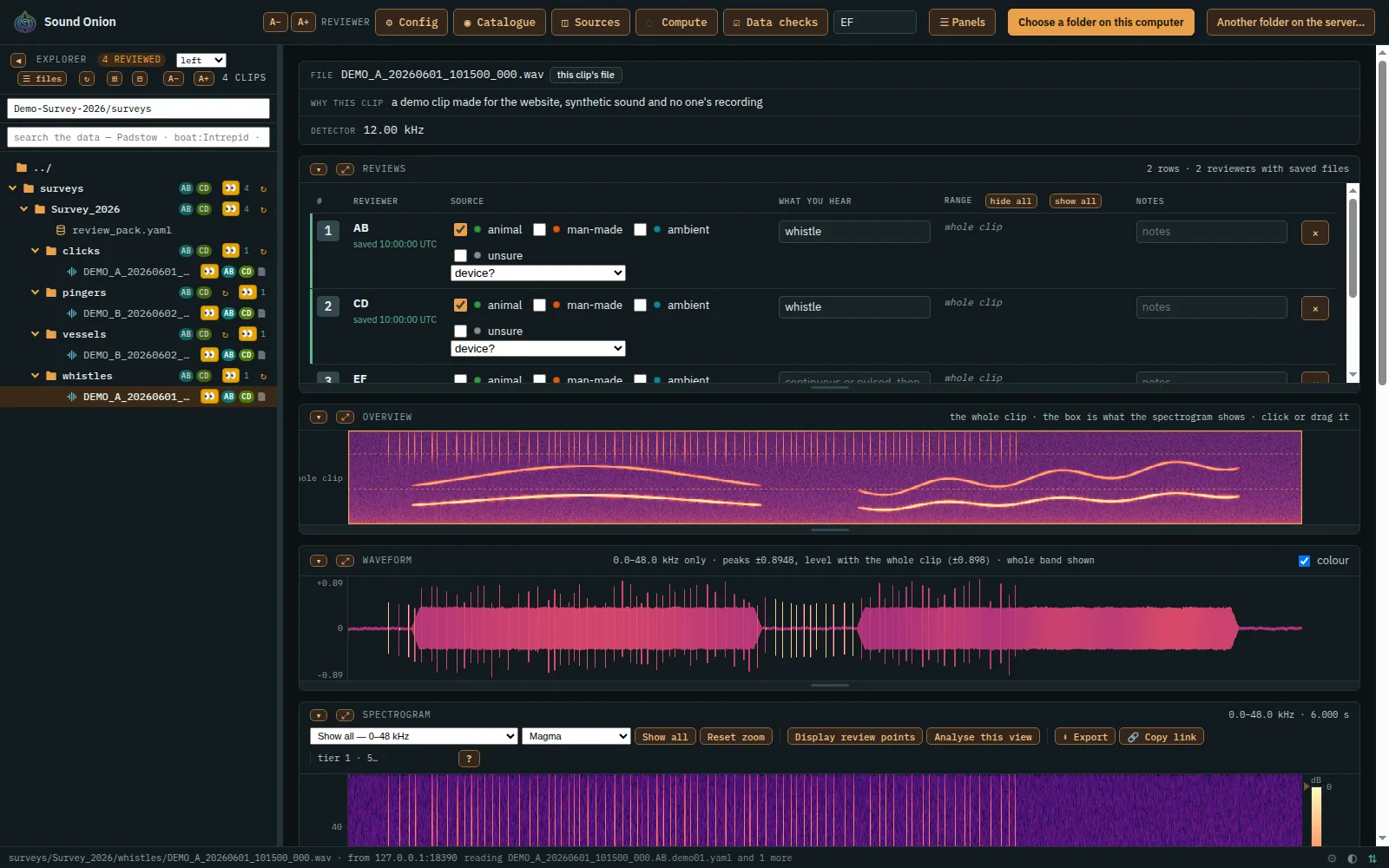
Mark a stretch of time, a frequency band, or both. Each mark becomes a row: what made the sound (animal, man-made, ambient or unsure), what you hear, the device, and notes.
Every reviewer
Each reviewer's initials show in their own colour in the file list; filter by yours, others' or not yet reviewed. Another reviewer's save appears on the open clip within seconds.
Every answer kept
An undo, a removed row or a change made after a couple of minutes is saved as a new file, so earlier answers are still there, with whose initials and when.
Propose new sounds
Propose a catalogue entry from what you measured; it counts as confirmed once someone else agrees.
Tags and shared words
Give a clip several coloured tags, from a list of words the whole team shares.
Correct what a program wrote
Your correction to a generated file is saved beside it, never over it, with who changed what and a way back.
Feed the analyser
The Publish results button gathers every reviewer's answers into one file the analyser learns from, named so you can trace it.
Your data, joined up
Your other data
Positions, sensor readings and samples taken alongside: we join them onto your recordings, each as its own file beside the recording.
Cross-reference
Join your data sets with each other and with public data sets, from a registry that records each one's licence.
Search the data
Search every recording's details by words,
field:value, comparisons and exclusions.Edit in place
Open YAML, JSON and Markdown as text and CSV as a table, and edit them in the page. A YAML or JSON file that would not parse is refused before it is saved.
Data checks
After each import, a list of what it found that needs your answer.
Old files keep working
Every data file we write says its format version, and an older one is brought up to date as it is read, never rewritten.
On the map
A map of a folder
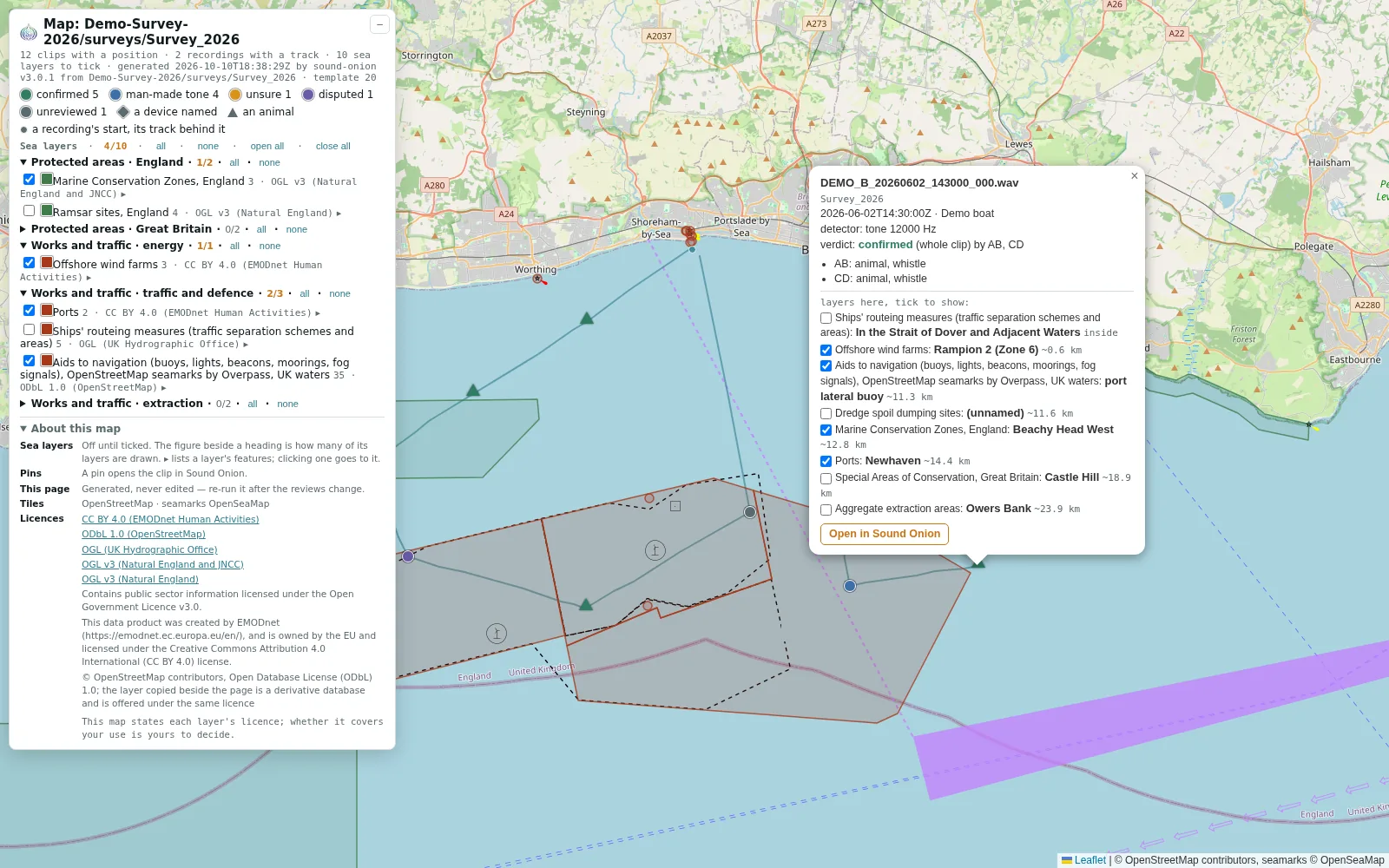
Every clip in a folder that has a position, as a pin coloured by its verdict, with the tracks it was recorded along and layers to switch on and off. Click a pin for its details and a link to its clip.
What is around
Each clip lists the areas it lies in and what is nearby, and opens the map at its own pin.
Your layers, your choice
A site's layers are chosen for that site: your own data, and open data sets such as protected areas, wind farms and seamarks. Each is listed with its publisher and licence; whether those terms cover your use is yours to decide.
Take it with you
| What | As |
|---|---|
| The view on screen, with its captions | PNG |
| The sound as you heard it, up to ten minutes: speed, band, shift, level and boost applied | WAV, 32-bit float |
| A link to a clip or a view | an address to send |
| A folder's map | HTML |
| Every reviewer's answers, for the analyser | YAML |
Fast on large surveys
Instant return visits
The file list is kept in your browser, so it appears at once and is checked in the background.
Your click first
What you click jumps ahead of everything loading behind it.
Runs where your data is
Open a folder on your own disk, in any browser, or in your own storage; nothing is uploaded just to look at it.
Talk to us
We are beta testing now and will open for business soon. Tell us what you record and how much of it there is: we will show you your own data in Sound Onion, and you will be among the first.
accounts@sound-onion.com